ATLAS#




ATLAS is a framework for multi-omic trajectory inference from paired single-cell RNA and ATAC sequencing data. By integrating transcriptional and chromatin accessibility information within a unified representation, ATLAS enables pseudotime reconstruction and cell fate prediction that directly incorporate regulatory dynamics. See our publication to learn more:
Leclercq, A., Martini, L., Bardini, R., Savino, A., & Di Carlo, S. (2026). ATLAS: A scverse-compatible package for multi-omic single-cell trajectory inference integration. bioRxiv. https://doi.org/10.64898/2026.05.23.727175
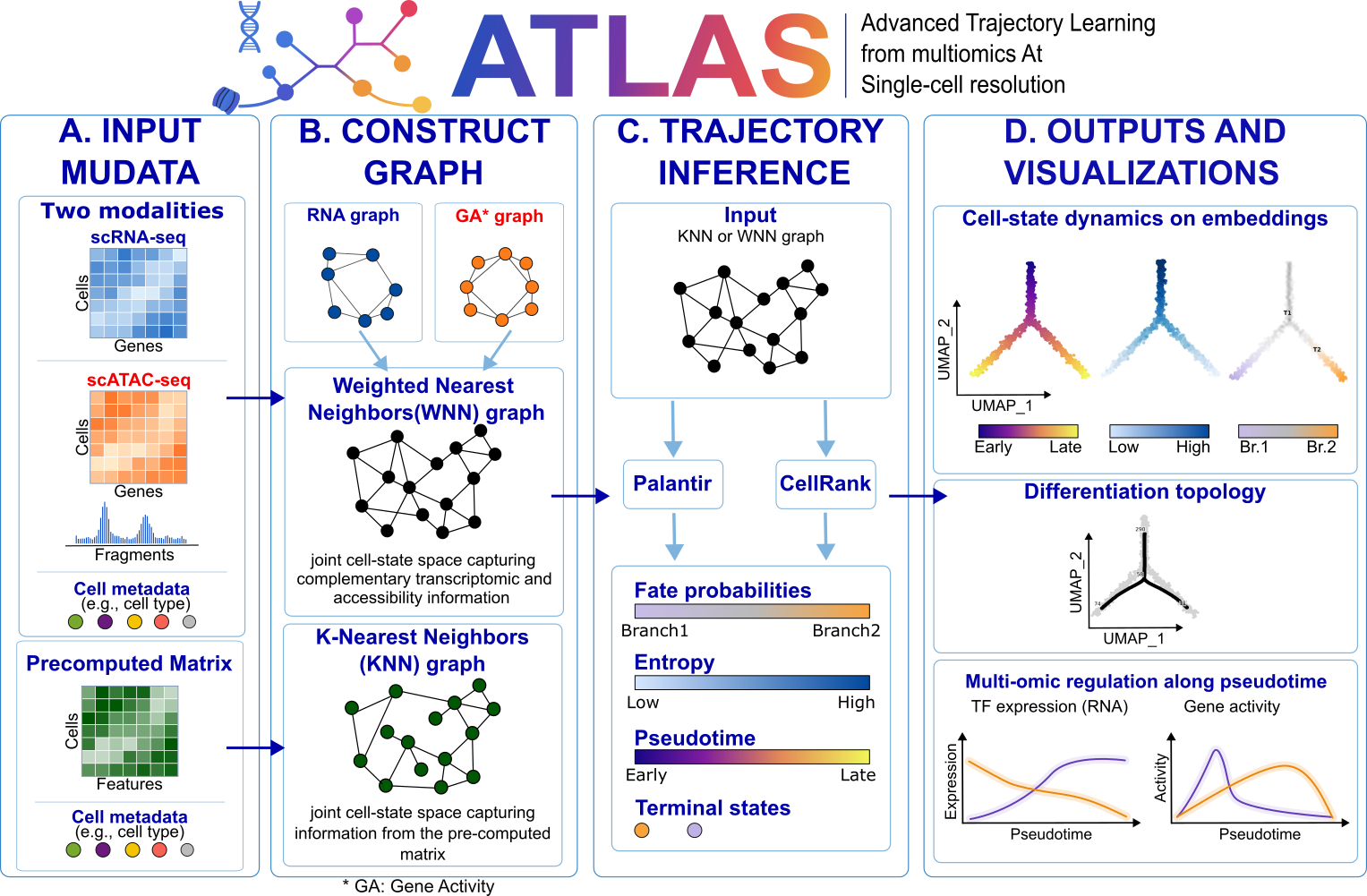
ATLAS main functionalities include:
Computation of gene activity from scATAC-seq data
Support for multi-omics representations using MuData
Creation of a Weighted Nearest Neighbors graph
Trajectory inference based on multiple strategies
Trajectory evaluation based on unsupervised metrics
Getting started#
Please refer to the documentation in particular, the API documentation.
Installation#
Install ATLAS into a fresh environment, created either with venv or with conda:
python -m venv atlas-env && source atlas-env/bin/activate
pip install atlas-smilies
conda create -n atlas python=3.13 && conda activate atlas
pip install atlas-smilies
Install into an environment you created for ATLAS. Installing into one that already holds other work might not work:
pipmay replace packages another tool installed and manages. On Intel macOS, follow the instructions below instead.
Optional components#
Three features draw on packages ATLAS does not install. Everything else works without them.
Fate tree figures need scFates, available as an extra:
pip install atlas-smilies[trees]
Keeping it separate lets ATLAS install without a compiler where that wheel is unavailable.
Gene activity from scATAC-seq (atlas.pp.compute_gene_activity) needs pysam to read
the fragment file.
Faster trajectory inference. atlas.tl.CellRankExtension.run defaults to
method="krylov", which needs petsc4py and slepc4py.
Without them CellRank falls back to method="brandts", which requires a dense
transition matrix. Evaluate conda forge or installation of PETSC and SLEPC.
Installing on Intel macOS#
macOS x86_64 (Intel) needs five packages from conda. pip install atlas-smilies alone
does not work there: on 3.11 to 3.13 it resolves and then fails to build, ending with
Failed building wheel for llvmlite, and on 3.14 it does not resolve at all. With the
trees extra, scikit-misc also has to be built from source, which needs a Fortran
compiler.
Install those packages from conda-forge first, then ATLAS on top:
conda create -n atlas -c conda-forge python=3.13 numba llvmlite jax jaxlib scikit-misc
conda activate atlas
pip install atlas-smilies[trees]
Release notes#
See the CHANGELOG
Contact#
For questions, bug report and help requests, please use the issue tracker
Disclaimer#
This project includes third-party code under MIT and BSD-3 licenses, see THIRD_PARTY_NOTICES for details.